
An essential step in the launch process for your business is opening a business bank account and setting up business payment systems. This step allows you to separate personal and business records, receive payments from customers, and begin tracking the business’s activities, which must be recorded using your chosen accounting method. In this article, I will first discuss the benefits of separating your personal and business finances, describe the process of opening a business bank account, and provide guidance on how to select and set up a payment system.
Benefits of Separating Personal and Business Finances
There are a myriad of excellent reasons to separate your personal and bank accounts:
1. Simplified Tax Filing
By keeping business transactions separate, you can easily track business expenses and income, making tax preparation much simpler. Clear records help you identify deductible expenses and avoid confusion when filing taxes, reducing the risk of errors or audits by the IRS.
2. Professionalism and Credibility
Having a business account improves your company’s professionalism and credibility. Customers and clients are more likely to view your business as legitimate, and it also allows you to receive payments made to your business name, rather than your personal account.
3. Improved Cash Flow Management
With a dedicated business account, you can better track cash flow, including profits, expenses, and any outstanding invoices. This separation allows you to monitor the financial health of your business more effectively and make informed decisions.
4. Easier Financial Management
Separating accounts ensures that personal expenses don’t mix with business expenses. This organization makes it easier to assess whether the business is profitable and helps you avoid accidental misuse of business funds.
5. Legal Protection
For LLCs or other legal entities, keeping separate accounts helps maintain the “corporate veil” and protects your personal assets from business liabilities, providing legal safeguards in case things go sour.
6. Building Business Credit
A separate business account is the minimum requirement for building business credit. Over time, you can establish a credit history for your business, which can be beneficial when applying for loans or credit lines with other businesses or banks in the future.
How to Create a Business Bank Account
1. Choose the Right Bank and Account Type
Start by researching banks that cater to small businesses. Look for accounts with low fees, convenient locations, and good customer service. Consider what types of services your business will need, such as merchant services, online banking, or access to business loans, and select an account type accordingly. It is very common that business owners start business bank accounts with their existing bank, which has the advantage of an existing financial relationship.
2. Gather Required Documents
To open a business account, you’ll generally need to provide the following documents, including:
- Employer Identification Number (EIN) or Social Security Number (SSN) if you’re a sole proprietor and have no employees.
- Official formation documents (e.g., Articles of Incorporation for an LLC or Corporation).
- Operating Agreement for LLCs, or partnership agreements.
- Identification (such as a driver’s license or passport) for the account signatory.
- Proof of address (e.g., utility bill).
Inquire with someone at the bank to find out the details of what they need before you go to create the account.
3. Review Terms and Fees
Before finalizing your account, make sure you understand the account’s fees, transaction limits, and other terms. Also, make sure you have all of the accounts you need (checking account, credit card, savings account, merchant account, etc.). Once the account(s) is set up, use it exclusively for business transactions to maintain accurate financial records.
4. Deposit Initial Funds
Many banks require an initial deposit to open the account. The minimum amount varies depending on the bank and account type. For accounting purposes, this initial deposit is an owner’s contribution, resulting in an increase to cash and an equal increase in owner’s equity. Think of it as your first investment in your small business- how exciting!
How to Choose and Set Up a Payment System
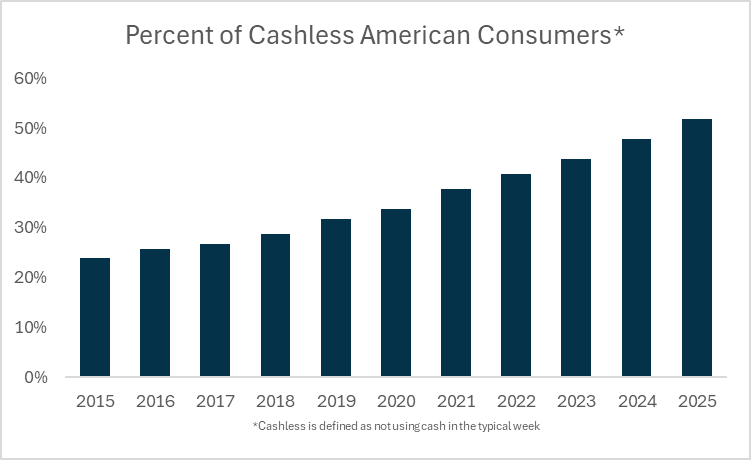
A payment system serves as the bridge between your customers’ bank accounts and your business bank account. It allows you to collect electronic funds in a convenient and secure manner, which keeps you and your customers happy. With the rise in cashless payment frequency, there is a need to adopt such systems for your business to remain competitive. There are two main types of payment systems that you can use.
Merchant Account with a Payment Gateway
The first type of payment system is a merchant account with a payment gateway. A merchant account is a bank account or financial institution that acts as an intermediary between your customer’s bank account, the payment processor, and your business. The general flow of funds is as follows:
- A customer swipes, taps, or enters their credit/debit card details.
- The transaction is sent for approval via the payment processor.
- If approved, the funds are held temporarily in the merchant account.
- After a short period (usually 1-2 business days), the funds are transferred to your business bank account.
Note that merchant accounts are separate from your business bank account and are solely used as a temporary holding place for transactions made with a customer’s debit or credit card. Merchant accounts also typically require an underwriting process where your business and personal credit history are reviewed.
A payment gateway is a technology that securely transmits card details from the customer’s bank account to the payment processor. A payment gateway is an absolute requirement for any online payment processing but may only be required for some physical card readers. The basic payment gateway function is as follows:
- The customer enters their payment details (online) or taps/swipes their card (in-store).
- The payment gateway encrypts and securely transmits the transaction to the payment processor.
- The processor verifies the details with the issuing bank and either approves or declines the transaction.
- If approved, the payment is sent to the merchant account for deposit.
Some services like Stripe and Square bundle merchant accounts with payment gateways, but if you use a traditional bank account, you may need to create a merchant account with your bank and then separately obtain a payment gateway (e.g., Authorize.net). The following chart displays some of the various features of the most common merchant accounts and payment gateways, which can be seen below.
Merchant account and payment gateway comparisons
| Provider | Transaction Fees | Monthly Fees | Funding Speed | Setup Complexity | Type | Best For | Pricing Variations |
|---|---|---|---|---|---|---|---|
| Helcim | 1.92% – 2.4% + $0.08 per transaction | $0 | 1-2 business days | Moderate | Bundled | Small & growing businesses seeking lower fees | Variable based on volume, no long-term contracts |
| Payline Data | 2.29% + $0.20 per transaction | $10 – $20 | 1-2 business days | Moderate | Bundled | Businesses processing $5K+ monthly | Custom pricing based on volume & business type |
| Dharma | 2.60% + $0.10 per transaction | $25 | 1-2 business days | Moderate | Bundled | Nonprofits & ethical businesses | Transparent pricing, mostly fixed with slight variations |
| Stax | Interchange + markup | $99 – $199 | 1-2 business days | Moderate | Bundled | High-volume businesses ($10K+ monthly) | Custom pricing for large-volume businesses |
| CDGcommerce | 2.75% flat rate | $0 – $10 | 1-2 business days | Easy | Bundled | Small businesses & startups | Transparent pricing, flat-rate options, volume discounts |
| Chase Payment Solutions | 2.6% + $0.10 per transaction | $0 | Same-day (Chase accounts), 1-2 days otherwise | Easy | Bundled | Businesses using Chase banking | Variable rates based on account type, integrations, and volume |
| TSYS | Varies (custom pricing) | Custom | 1-2 business days | Complex | Merchant Account Only | Enterprise & high-volume businesses | Fully customized pricing based on business needs |
| National Processing | 2.7% + $0.10 per transaction | $0 | 1-2 business days | Easy | Merchant Account Only | Restaurants, retailers, eCommerce | Custom pricing based on industry & volume |
| Authorize.Net | 2.9% + $0.30 per transaction | $25 | 1-2 business days | Easy | Payment Gateway Only | Online businesses with an established merchant account | Customizable depending on services like fraud detection, recurring billing |
Third-Party Transaction Services
Third-party transaction services, similar to merchant accounts, act as intermediaries between businesses and credit card networks. However, instead of having your own individual merchant account, third-party transaction processors group multiple businesses into a single account (hence why they are also called payment aggregators). Don’t worry, your revenue will not be shared with other businesses, but the temporary holding place for your money will be shared. This is the basic process:
- Customers pay using credit cards, debit cards, or other electronic means (e.g. a digital wallet like Apple pay).
- The third-party processor receives and processes the payment under its own merchant account.
- Funds are collected and then transferred to the business’s bank account.
As you can see, third-party transaction services are a bit simpler than having a merchant account and payment gateway. Third-party transaction services also require no underwriting, which makes them ideal for businesses with no credit history. For this reason, most small businesses use payment aggregators. I have summarized the main differences between payment aggregators and merchant accounts in the chart below.
Merchant accounts vs third-party transaction services
| Feature | Merchant Accounts with Payment Gateways | Third-Party Transaction Services |
|---|---|---|
| Setup | Requires more setup, including contracts, approvals, and direct relationships with banks. Will almost certainly require days or weeks of negotiation and may require help from lawyers. | Easier setup, often with a quick sign-up process, and no direct relationship with a bank. No need for underwriting services. |
| Fee Structure | Uses interchange-plus, flat-rate, or tiered pricing with transaction fees, monthly fees, and sometimes minimums. The fee structure can often be optimized to your business. | Fees are flat or percentage-based, often with no setup fees. Per-transaction fees almost certainly higher than with merchant accounts. |
| Control over Transactions | Full control over the payment process, including payment gateway management. | Limited control, as the third-party service handles the entire payment process. |
| Customization | Highly customizable with options for payment features, branding, and customer experience. | Limited customization options, as the service is standardized for all users. |
| Access to Funds | Funds are deposited directly into a business bank account after processing, usually in a few business days. | Funds are held by the third-party service, which can take a day or two to transfer to your bank. |
| Risk | Higher risk for fraud or chargebacks, which businesses must manage, though protection options are available. | Lower risk, as the third party manages fraud and chargebacks. |
| Customer Support | Dedicated customer service through the payment processor and bank. | Customer support provided by the third-party service, often with limited options compared to merchant accounts. |
| Approval Requirements | Requires credit check and underwriting process for approval. | No formal approval process; anyone can sign up to accept payments. |
| Ideal For | Larger businesses, businesses with higher transaction volumes, or those seeking a fully branded payment experience. | Small businesses, freelancers, or businesses with low transaction volumes that prefer simplicity and convenience. |
There are a variety of payment aggregators out there to choose from. If you sell higher-priced products, you want to pick a provider that charges a lower percentage but a higher fee per transaction. Conversely, if you sell low-priced products, you want to pick a provider charging a higher percentage but a lower fee per transaction. You will also want to consider which provider provides the best support and fraud protection for the type of business you operate. I have listed some of the most common providers below and provided some comparisons between them.
Payment aggregator comparison
| Payment Aggregator | Setup Fees | Transaction Fees | Monthly Fees | Contract Length | Payout Speed | Supported Payment Methods | Best For | Features |
|---|---|---|---|---|---|---|---|---|
| PayPal | None | 2.9% + $0.30 | None | None | 1-2 days | Credit/Debit Cards, PayPal, Venmo, ACH | Small businesses, freelancers | Widely accepted, strong fraud protection, easy integration |
| Square | None | 2.6% + $0.10 | None | None | 1-2 days | Credit/Debit Cards, Apple Pay, Google Pay | Small to medium businesses | Free POS, mobile payments, invoicing, no monthly fees |
| Stripe | None | 2.9% + $0.30 | None | None | 2-7 days | Credit/Debit Cards, Apple Pay, Google Pay | Online businesses, developers | Developer-friendly, customizable checkout, subscriptions |
| Venmo | None | 1.9% + $0.10 | None | None | 1-2 days | Credit/Debit Cards, Venmo, PayPal | Small businesses, freelancers | Easy integration with PayPal, younger customer base |
| Amazon Pay | None | 2.9% + $0.30 | None | None | 2-7 days | Credit/Debit Cards, Amazon Balance | Businesses with online sales | Easy for Amazon users, trusted by customers |
| Adyen | Custom | Custom | Custom | Custom | 1-2 days | Credit/Debit Cards, ACH, Alipay, Apple Pay | Large businesses | Global payment solutions, multi-currency support |
| Braintree | None | 2.9% + $0.30 | None | None | 2-5 days | Credit/Debit Cards, PayPal, Apple Pay | Online businesses, subscription models | Owned by PayPal, recurring billing, mobile-friendly |
| WePay | None | 2.9% + $0.30 | None | None | 2-5 days | Credit/Debit Cards, ACH | Platforms like marketplaces | Integrated with other platforms (e.g., GoFundMe, FreshBooks) |
| 2Checkout | None | 2.9% + $0.30 | None | None | 2-5 days | Credit/Debit Cards, PayPal, Alipay | Global online businesses | Global support, recurring billing, subscription management |
Form 1099-K
If you use a payment aggregator and meet certain thresholds, your payment aggregator is required to issue you a Form 1099-K. This form will help you report your business income to the IRS and should match your accounting records. The thresholds for Form 1099-K are changing, so they have been listed below.
2023 & Prior: $20,000 AND 200 transactions
2024: $5,000 (any number of transactions)
2025: $2,500 (any number of transactions)
2026 & Beyond: $600 (any number of transactions)
You should note that even if you do not receive Form 1099-K, you are still required to report any income received through payment aggregators to the IRS.
And there you have it! I hope you have found this article helpful. Continue to do your research and find the best payment method for you, as well as the most suitable business bank account for your business. With both in hand, you are well prepared to receive, issue, and track payments for your small business!
 The Accounting Geek
Leave a comment